


Short videos are no longer a trend. They are a standard way for people to find and judge a business. A thirty-second clip can show your work, your team and your style faster than a page of text.
The good news is that you do not need a studio. A phone, daylight and a clear idea are enough. This guide shows how to plan, film and share short-form video that helps your business grow.
Why short-form video works
Video holds attention. It lets people see a real person, hear a real voice and watch a real result. That builds trust faster than a stock photo does.
The data points the same way. Socialinsider studied millions of organic brand posts from accounts with 1,000 to 1 million followers, posted between October 2025 and March 2026. On Instagram, Reels earned a 0.50% engagement rate, close to the top format. On Facebook, Reels earned 0.20% and led every other format, while link posts earned only 0.05%. You can see the full breakdown in the Socialinsider posting frequency study.
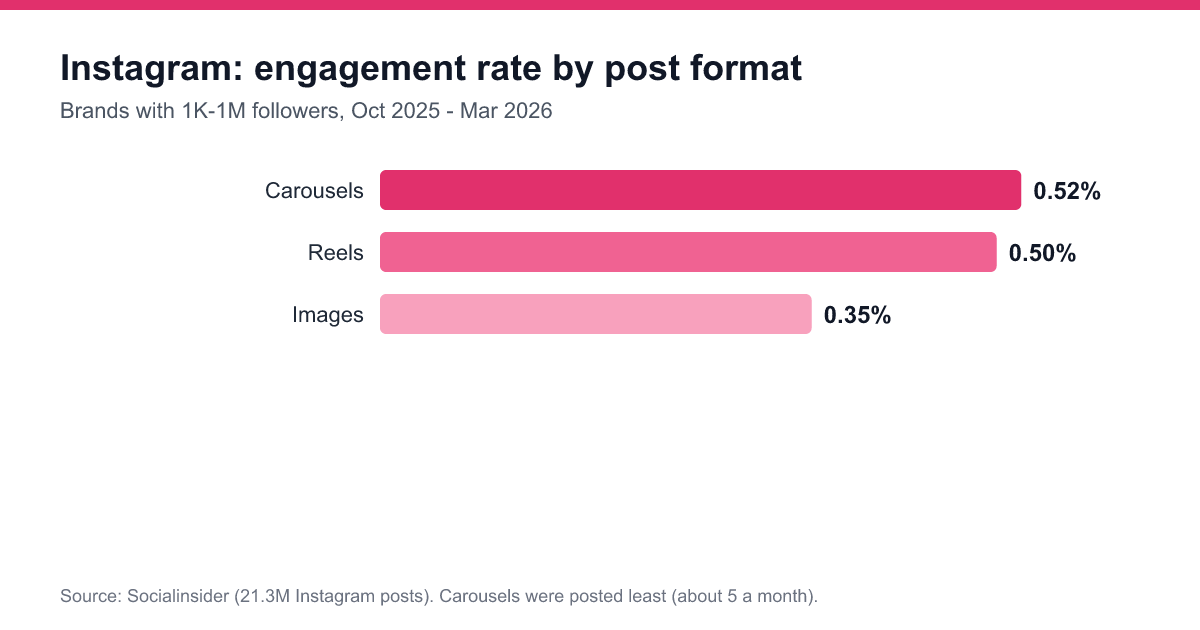
Notice one more detail. Carousels beat Reels on Instagram at 0.52%, even though brands posted them least. So video is a strong tool, not the only one. Mix formats and see what your own audience likes.
Start with a clear goal
Before you press record, decide what the video should do. Pick one goal:
- Teach something small.
- Show a result or a before and after.
- Introduce a person on your team.
- Answer a common question.
- Invite people to visit your website or call.
One video, one job. If you try to do everything in thirty seconds, the message gets lost.
Plan the video in three parts
Good short videos follow a simple shape.
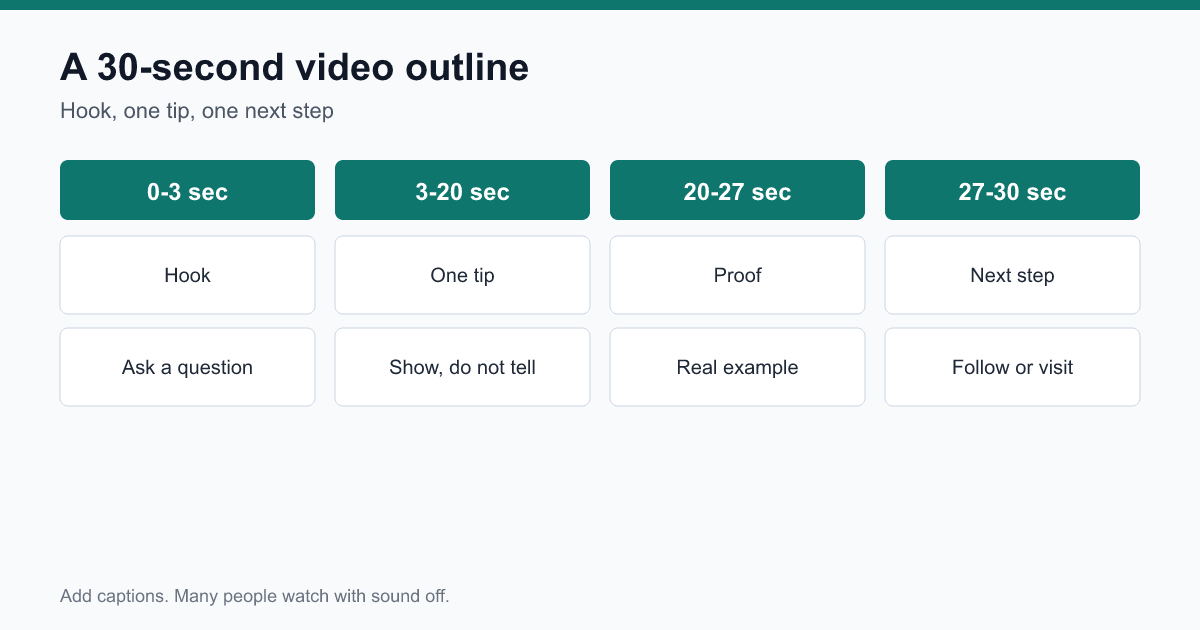
The hook (first 3 seconds)
Most viewers decide in a few seconds if they will keep watching. Start with a question, a bold result or a problem. For example: "Your website may be losing customers right now. Here is why." Do not start with a long hello or a logo.
The middle (about 20 seconds)
Give one tip, one step or one story. Show it, do not just describe it. If you fix a leaky tap, show the tap. If you explain a checklist, show the checklist on screen.
The ending (last 5 seconds)
Tell people what to do next. Follow for more tips. Visit the link in our bio. Send us a message. Keep it short and friendly.
Film with what you have
You do not need pricey gear. These basics matter more than any camera:
- Light: Face a window. Natural light looks better than most lamps.
- Sound: Film in a quiet room. Clear audio matters more than sharp video.
- Steady shots: Lean the phone on a stack of books or use a cheap tripod.
- Vertical format: Hold the phone upright so the video fills the screen.
- Clean background: Remove clutter behind you.
Add captions
Many people watch videos with the sound off, on a train, in a waiting room or at work. Captions let them follow along. They also help viewers who are hard of hearing. Most platforms add captions in a tap. Check them for mistakes before you post.
Video ideas for small businesses
Stuck for ideas? Try these:
- A tour of your workspace or shop.
- A fast answer to the question customers ask most.
- A day in the life of your team.
- A before and after of your best project.
- A myth in your industry, and the truth.
- A short customer thank-you or review, with permission.
- A simple tip people can use today.
- A look at how a product or service is made.
Pick two or three and film them in a single session. Filming in batches saves time and gives you a stock of content for the weeks ahead.
How often should you post video?
In the same study, brands posted about 10 Instagram Reels and about 7 Facebook Reels a month on average. That is roughly two a week. For a small team, that is a good target. If it feels like too much, start with one a week and keep it up for a couple of months. A steady pace beats a burst followed by silence.
Write captions that help the video
The text under the video still matters. Write a short line that adds context. Ask a question that invites comments. Add a few relevant hashtags, not a long block. Put the website link in your profile or in the caption where the platform allows it.
Keep it real
Viewers can tell when a video feels forced. Speak the way you talk to a customer. A small slip or a laugh is fine. Honest and helpful beats polished and stiff every time.
Reply to every comment
When someone comments, answer within a day. You can even reply with a new short video if the question is a good one. This keeps the conversation going and shows people that you listen.
Measure what works
After a month, look at your numbers. Which videos earned the most views, shares, saves and clicks? Look at the hook, the topic and the length of each winner. Then make more videos like those. Drop the formats that fall flat.
Do not worry about one video that does badly. Test, learn and try again.
A sample script you can copy
Here is a simple script for a local service business. Adjust the words to fit your own voice.
- Hook: "Three things that quietly hide your business on Google Maps."
- Tip one: "First, your business name must match everywhere it appears online."
- Tip two: "Second, answer every review, good or bad."
- Tip three: "Third, add fresh photos every month."
- Next step: "Want a free checklist? Visit the link in our bio."
Read it aloud once. If you run out of breath, cut a sentence. Short lines keep the pace quick and the message clear.
Repurpose each video
One video can feed several posts. Turn the tips into a carousel. Post a still frame with the best line as a quote image. Share the clip on every platform where your customers spend time, and change the caption to suit each one. This gives you more reach from the same effort.
Common mistakes to avoid
- Long intros. People leave before the point.
- No captions. You lose everyone watching on mute.
- Too much selling. Teach and show first.
- Poor sound. Fix audio before you worry about looks.
- No next step. End each video with one clear action.
- Posting once and vanishing. Consistency builds an audience.
Connect video to your website
A video is a front door. Your website is the room people walk into next. Make sure your key pages load quickly, explain your services in plain words and make it easy to get in touch. If you want help joining up your video, social and search efforts, the team at Online Workings can help you build a plan.
Your first week plan
- Choose one goal and one topic.
- Write a three-part outline: hook, tip, next step.
- Film two or three videos in one sitting.
- Add captions and check them.
- Post one video, then another a few days later.
- Reply to comments and note the results.
Short-form video is simple once you have a routine. Start small, keep your sentences short and your tips useful. Over a few weeks, you will learn what your audience loves.

