
A blurry logo can make an otherwise professional product look unfinished. If you enlarge a small JPG or PNG for a banner, uniform, label, or promotional item, its edges may become rough and unclear. Our Professional Vector Art Services convert raster images, logos, and sketches into clean, scalable vector artwork. We focus on recreating the important shapes, lines, and colors so your design is easier to use across different applications.
Your artwork also needs the correct file format before it goes to a printer or production team. At ZDigitizing, we help prepare vector files for applications such as screen printing, sublimation, DTF printing, and other graphic production needs. In this guide, we'll explain how vector conversion works, which formats you may need, and what you should check before approving your final design.
What Are Vector Art Services?
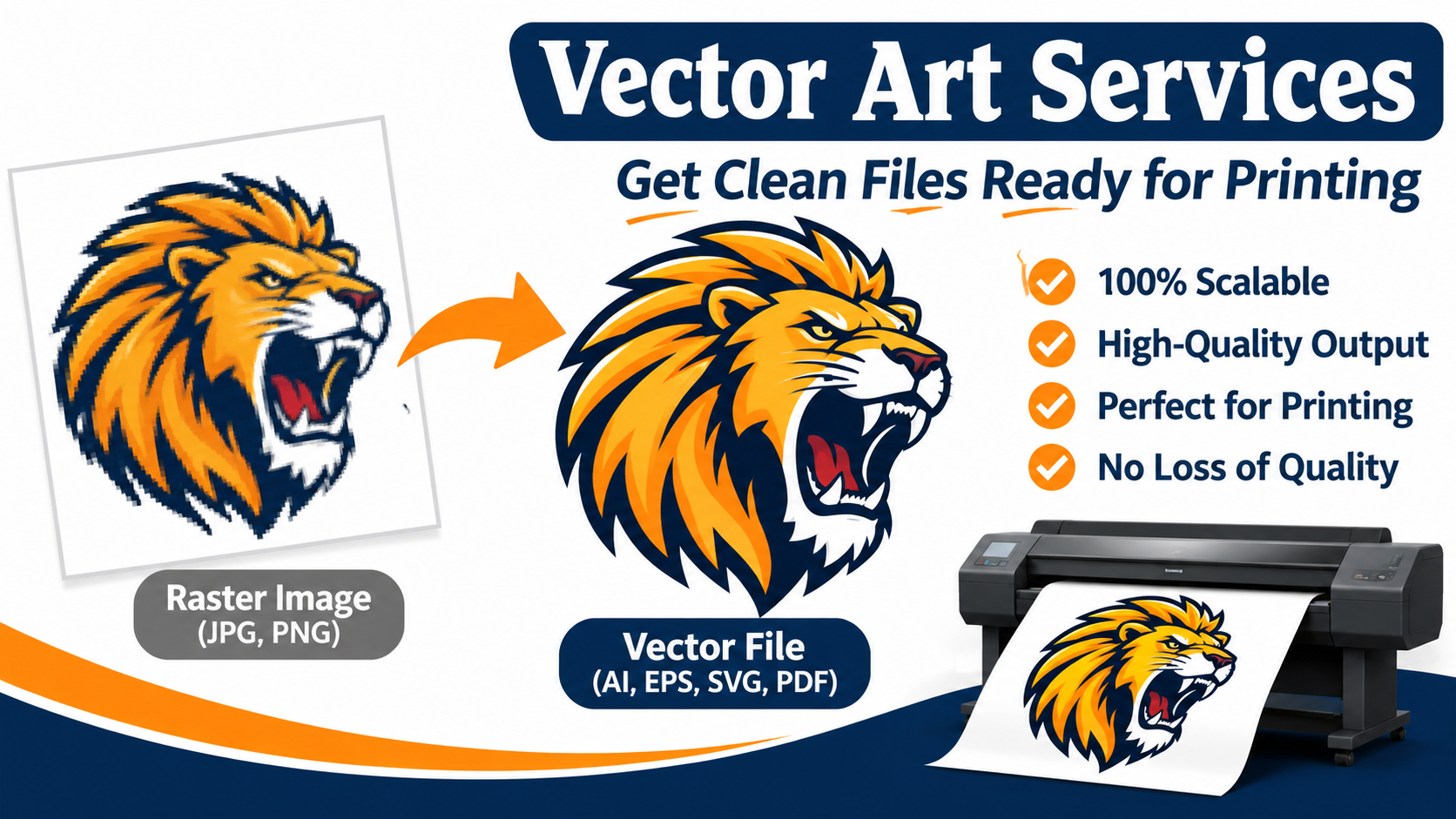
Vector Art Services convert or recreate artwork as paths, curves, lines, and shapes instead of a fixed collection of pixels. These elements allow a vector graphic to be resized without losing the sharpness of its outlines.
For example, imagine you have a company logo saved as a small JPG. It looks clear on your website, but when you enlarge it for a storefront sign, the edges become pixelated. Converting the logo into vector artwork gives you a scalable version that can be adjusted for different dimensions.
Our vector artwork solutions cover several types of design preparation:
-
Raster-to-vector conversion
-
Picture and logo conversion
-
Hand-drawn artwork conversion
-
Logo cleanup and redesign
-
Image redraw for damaged or unclear designs
-
Color separation for printing
-
Image masking
-
Photo retouching and restoration
The right approach depends on the original artwork and how you plan to use the finished design.
Why Does Vector Artwork Matter for Printing?
Vector artwork is useful for printing because its paths and shapes retain clean edges when resized. It also makes many logos and illustrations easier to edit before production.
Consider a business that uses one logo on business cards, T-shirts, packaging, and large banners. Each application may require a different size. If the business relies on a small raster image, enlarging it can reduce visual quality. A properly prepared vector master provides more flexibility for resizing and editing.
Here are some practical benefits:
1. Sharp Edges at Different Sizes
Vector graphics can be enlarged or reduced without the pixelation associated with stretching a low-resolution image. This is especially useful for logos and illustrations that appear on products of different sizes.
2. Easier Color and Shape Editing
Vector artwork allows individual elements to be adjusted when the file is properly created. You can change colors, modify outlines, adjust shapes, or prepare a variation without rebuilding the entire design.
3. Flexible Production Options
Vector files can support different production workflows, including screen printing, sublimation, and certain cutting or engraving processes. Your production provider may still require specific file settings, so we recommend confirming those requirements before submitting the artwork.
Raster vs. Vector: Which File Should You Choose?
Raster and vector graphics serve different purposes. Raster images use pixels, while vector graphics use mathematical paths and shapes.
Common raster formats include JPG, JPEG, PNG, BMP, GIF, and TIFF. These formats are useful for photographs and images with natural textures, shadows, and complex color transitions. However, a low-resolution raster image may become blurry when enlarged.
Common vector formats include AI, EPS, SVG, and vector-based PDF. These formats are commonly used for logos, illustrations, lettering, and graphics that need resizing or editing.
|
Feature |
Raster Artwork |
Vector Artwork |
|
Structure |
Pixels |
Paths and shapes |
|
Enlarging |
Can become pixelated |
Retains clean outlines |
|
Editing |
Often limited by image quality |
Individual elements may be editable |
|
Common formats |
JPG, PNG, TIFF |
AI, EPS, SVG, PDF |
|
Best suited for |
Photos and detailed images |
Logos, icons, and illustrations |
We recommend choosing the format based on your project. A photograph with realistic textures may be better as a high-resolution raster image. A logo with defined outlines and solid colors is often a better candidate for vector conversion.
How Do We Convert Your Image into Vector Artwork?
The conversion process depends on the design. A simple logo with clear outlines may need less editing than a damaged image containing small text, overlapping shapes, or unclear colors.
Our process involves several important steps.
Step 1: Review Your Original Artwork
We begin with the image you provide. You can submit a JPG, PNG, scanned drawing, existing vector file, or another supported format. We recommend sending the clearest version available because visible details help us understand the original design.
Step 2: Identify Shapes, Text, and Colors
We examine the important design elements before tracing. These may include lettering, outlines, borders, separate color areas, and decorative details.
This step matters because the converted artwork should maintain the recognizable appearance of your original design. If your logo includes specific lettering or brand colors, those elements need careful attention.
Step 3: Trace and Recreate the Design
We use vector tracing to recreate the artwork with editable paths and curves. Manual refinement helps control the outlines and shapes instead of depending entirely on automatic conversion.
Automatic tracing can sometimes create unnecessary anchor points, rough curves, or unwanted shapes. Those issues may need additional editing before the artwork is ready for use.
Step 4: Clean Up the Artwork
After tracing, we review the shapes, outlines, proportions, and color areas. If the original image contains damaged or unclear details, image redraw or logo cleanup may be more appropriate than basic tracing.
Step 5: Prepare the Required File Format
We prepare the requested output format based on your project requirements. If your printer or production partner needs a particular file type, share that information before placing your order.
Which Vector File Formats Can You Request?
The correct format depends on the software and production workflow you plan to use. We provide several commonly requested formats through our Professional Vector Art Services.
-
AI: Commonly used for editable artwork in Adobe Illustrator.
-
EPS: Often requested for professional graphics and printing workflows.
-
SVG: Useful for scalable web graphics and compatible design applications.
-
PDF: Convenient for sharing and printing when it contains vector elements.
-
WMF: Used in some Windows-based graphics and document applications.
-
EMF: Another format supported by certain Windows design and document workflows.
One important detail: changing a JPG extension to PDF does not make the image a vector. A PDF can contain raster images, vector shapes, or both. If you need editable paths, the artwork must be traced or recreated as vector elements.
If your production partner requests another format, send us the specification so we can check the available options.
Where Can You Use Vector Artwork?
Vector artwork supports different types of design and production projects. The final setup depends on the equipment, material, and requirements of the production provider.
Screen Printing
Screen printing uses separate color areas to transfer artwork onto materials such as fabric, paper, wood, or plastic. Vector graphics can help maintain clean outlines and make color separation easier to prepare.
Sublimation Printing
Sublimation uses heat and ink to transfer designs onto compatible products. Vector artwork can help keep logos and defined graphic elements clear during preparation. Your printing provider can confirm the required color settings and file specifications.
DTF and DTG Printing
Direct-to-film and direct-to-garment printing are used for decorating apparel. Vector graphics can be useful for preparing logos and other design elements, although the final production file may need to follow the printer's specific requirements.
Signs, Banners, and Branding
Businesses often use the same logo on business cards, storefront signs, vehicle graphics, product packaging, and event banners. A scalable vector master makes it easier to adapt the design to different dimensions.
Laser Cutting and Engraving
Some laser workflows use vector paths to guide cutting or engraving equipment. Depending on the machine and material, the artwork may need specific line settings or closed shapes before production.
What Should You Check Before Ordering Vector Artwork?
Clear instructions help us understand your project and prepare the artwork according to your requirements. Before submitting your design, provide:
-
Original artwork: Send the clearest image or existing design file available.
-
Intended use: Explain whether you need the design for apparel, printing, signage, engraving, or branding.
-
Required format: Confirm whether your production partner accepts AI, EPS, SVG, PDF, or another format.
-
Color requirements: Share your brand colors or explain any changes you want.
-
Editing instructions: Tell us whether you want the original design preserved, cleaned up, or redesigned.
-
Production specifications: Include any size, layout, or technical requirements provided by your printer.
We use these details to understand what you need and prepare the requested artwork. If your project also involves machine embroidery, remember that vector artwork and embroidery stitch files are different. The vector design must go through a separate digitizing process to become a machine-readable embroidery file.
Get Your Artwork Ready for Professional Production
A clean vector file gives you more flexibility when using the same logo or graphic across different products and marketing materials. The key is to provide the best available source image, select the correct output format, and explain your production requirements before conversion.
At ZDigitizing, we help convert raster images, logos, and sketches into vector formats such as AI, EPS, SVG, PDF, WMF, and EMF. If your design needs tracing, cleanup, or redrawing, send us your artwork and explain how you plan to use it. We'll help you prepare a vector file for your next printing or branding project.
Frequently Asked Questions
1. What are Vector Art Services used for?
They convert raster images, logos, and sketches into scalable vector graphics. Businesses commonly use vector artwork for signs, banners, apparel printing, labels, packaging, promotional products, and brand identity materials.
2. Can you convert a blurry logo into a vector file?
Yes. We can recreate a low-resolution or unclear logo as vector artwork. The amount of editing depends on the original image, its complexity, and how closely you need the finished design to match the source.
3. Which vector format is best for printing?
AI, EPS, SVG, and vector-based PDF are commonly used formats. The best option depends on the software and production workflow used by your printer. We recommend confirming the required format with your production provider before submitting the final artwork.
4. Is manual vector tracing better than automatic tracing?
Manual tracing gives the designer more control over shapes, curves, and small details. Automatic tracing can work for simple designs, but it may create rough edges or unnecessary points. Manual refinement can help produce cleaner artwork when accuracy matters.
5. Can vector artwork be used for embroidery?
Yes, vector artwork can serve as a source for embroidery digitizing, but it is not a machine-ready stitch file. We must convert the design into stitches and adjust it according to the fabric, design size, and embroidery requirements.
