


Introduction
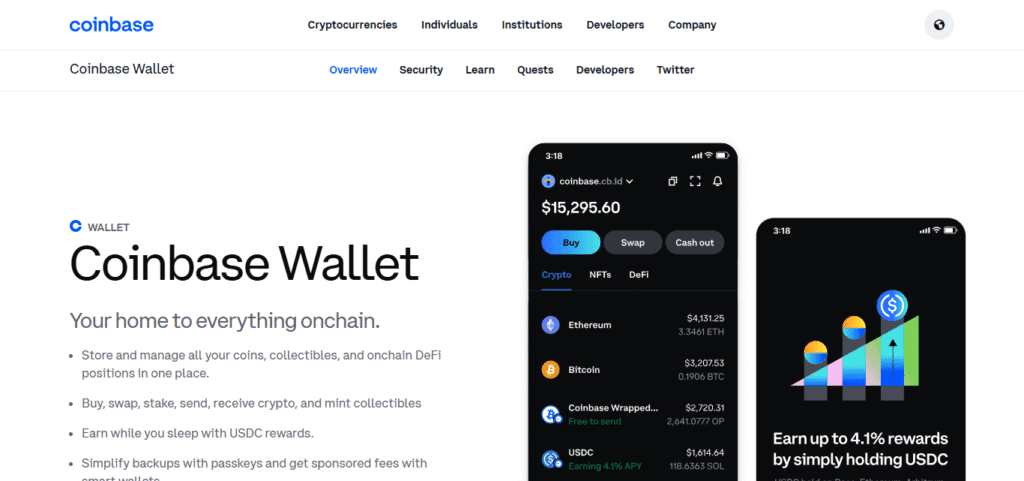
Coinbase Wallet is a self-custody wallet designed to help users manage their digital assets and explore blockchain-based applications. It provides a convenient way to store supported assets, access decentralized applications, and interact with different blockchain networks. Unlike a traditional exchange account, a self-custody wallet gives users control over their private keys and recovery phrase.
Whether you are new to digital wallets or already familiar with blockchain technology, understanding how Coinbase Wallet works can help you make informed decisions about managing your digital assets.
What Is Coinbase Wallet?
Coinbase Wallet is a non-custodial digital wallet that allows users to manage supported cryptocurrencies and other blockchain-based assets. It is designed to give users direct control over their wallet credentials rather than having a third party manage their private keys.
The wallet supports compatible blockchain networks and provides access to decentralized applications, digital collectibles, and other Web3 services. Users can explore supported features through its mobile application or browser extension, depending on device compatibility and availability.
It is important to understand that Coinbase Wallet and the Coinbase exchange are separate products. While they belong to the same broader ecosystem, their account structures and responsibilities are different.
Important Features of Coinbase Wallet
Coinbase Wallet offers several features that make managing digital assets more accessible.
1. Self-Custody Management
One of its main features is self-custody. Users maintain control of their private keys and recovery information. This provides greater independence but also means they are responsible for protecting their wallet credentials.
2. Multiple Asset Support
The wallet supports various digital assets across compatible blockchain networks. Users can view supported balances and manage eligible assets through one interface.
3. Decentralized Application Access
Coinbase Wallet allows users to connect with supported decentralized applications. These applications may provide services involving decentralized finance, digital collectibles, blockchain games, and other Web3 experiences.
4. NFT Management
Users can explore and manage supported non-fungible tokens through compatible wallet features. NFT functionality and visibility may depend on the network and application version.
5. Mobile and Browser Access
Depending on availability, users can access Coinbase Wallet through mobile devices or a browser extension. These options provide flexibility when managing assets or interacting with supported applications.
How to Get Started With Coinbase Wallet
Getting started involves a few basic steps. First, visit the official Coinbase website and locate the verified Coinbase Wallet download page. Choose the compatible application or browser extension for your device.
After installation, follow the displayed instructions to create a new wallet or import an existing one. During setup, the wallet may generate a recovery phrase. This phrase is essential because it can help restore access to your wallet.
Write the recovery phrase down and keep it somewhere private and secure. Never share it with another person, enter it into an unverified website, or send it through email or messaging applications.
Once setup is complete, explore the wallet interface to understand its available options. Review supported networks, asset information, and transaction settings before making any transfers.
Security Practices for Protecting Your Wallet
Security is an important part of using any self-custody wallet. Since users control their own recovery information, protecting it should always be a priority.
Consider following these practices:
-
Never disclose your recovery phrase or private keys.
-
Download wallet software only from verified official sources.
-
Use a strong password and available device security features.
-
Verify wallet addresses before sending assets.
-
Check network compatibility before completing transactions.
-
Avoid suspicious links, unexpected messages, and unknown applications.
-
Review transaction details carefully before approving them.
Remember that legitimate support representatives should never ask you to reveal your recovery phrase.
Benefits of Using Coinbase Wallet
Coinbase Wallet provides flexibility for people interested in managing digital assets independently. Its self-custody structure gives users control over their wallet credentials, while its application connectivity makes exploring supported blockchain services more convenient.
The interface also brings several wallet activities together, helping users review assets and access compatible Web3 applications without relying entirely on centralized platforms.
However, self-custody involves responsibility. Transactions may be irreversible, network fees can apply, and unsupported assets or networks may create difficulties. Users should understand these limitations before using the wallet.
Conclusion
Coinbase Wallet offers a practical way to manage supported digital assets and explore the expanding Web3 ecosystem. Its self-custody approach, decentralized application access, and flexible platform options make it a useful tool for users who want greater control over their digital wallets.
Before getting started, always verify the official download source, protect your recovery phrase, and review every transaction carefully. A clear understanding of wallet features and security responsibilities can help create a safer and more confident digital asset management experience.
